
Linkfyn › Guides › Linktree alternative
A Linktree alternative for businesses that sell on WhatsApp
Linktree is a good list of links. It was built for creators who send followers to videos, music and shops that already have a checkout. A business that sells through WhatsApp needs something else from its link in bio: the order itself, with the size, the date and the price, before the chat starts. This page compares the two fairly, with prices, and says when Linktree is still the better pick.
Linkfyn is invite-only for now, and free during early access. Leave your email and we'll send you an invite.
Pick your page's address. Free to start, no card needed.
Short answer. Keep Linktree if your followers only need to reach your content, or if you sell digital products with a checkout. Use Linkfyn if a customer has to ask you something before they can buy: a custom cake, a printed jersey, a facial, a photo shoot. Linkfyn asks those questions on the page, shows a price, opens WhatsApp with the order typed, and keeps the order on a board until it is paid.
What Linktree does well
Linktree made the link in bio a normal thing, and more than 70 million people use it by its own count. For its own job it is hard to fault:
- It takes two minutes. Paste links, pick a look, done.
- It suits creators. Music, videos, podcasts and newsletters show well, and it can collect emails and phone numbers.
- It sells digital things. Its paid plans have digital products, courses, affiliate links and social post scheduling.
- Everyone knows it. A follower who sees a Linktree page knows what to do with it.
If that is your business, you don't need an alternative. Stay where you are.
Where it stops for a business that sells in chat
For a shop that sells through WhatsApp, the Linktree page usually has one link that matters: "WhatsApp us". A follower taps it and an empty chat opens. Then the same conversation happens for the hundredth time. How much is it? Which size? For when? Can you deliver? Ten messages later the customer goes quiet, and you can't tell which post or ad brought them.
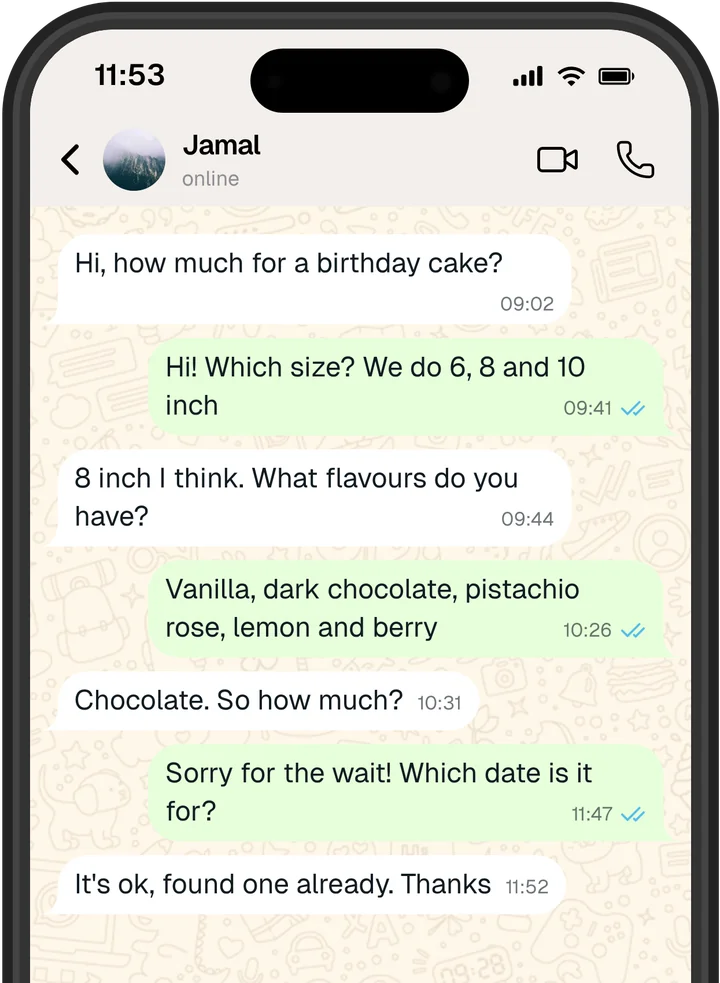
Linktree counts that visit as one click. It can't tell you whether the click became an order, because the order happened somewhere it can't see. That is the gap, and no amount of new button styles closes it.
What a WhatsApp seller needs instead
Four things, in the order a customer meets them:
- A page that looks like a business. Photos, what you make, reviews, opening hours and where you are, with one main button. On Linkfyn this is built from blocks, and it is a real web page that Google can list under your business name.
- A form that asks your questions. Size, flavour, quantity, date, pickup or delivery. Each answer can carry a price, so the customer sees an estimate before they message you.
- One message in WhatsApp. When the customer sends the form, WhatsApp opens on their phone with the whole order typed. You get a complete order in the first message.
- A record of every order. Each sent form is saved on a board with five stages, New, Talking, Quoted or booked, Won and Lost, so a busy week doesn't depend on scrolling back through chats.
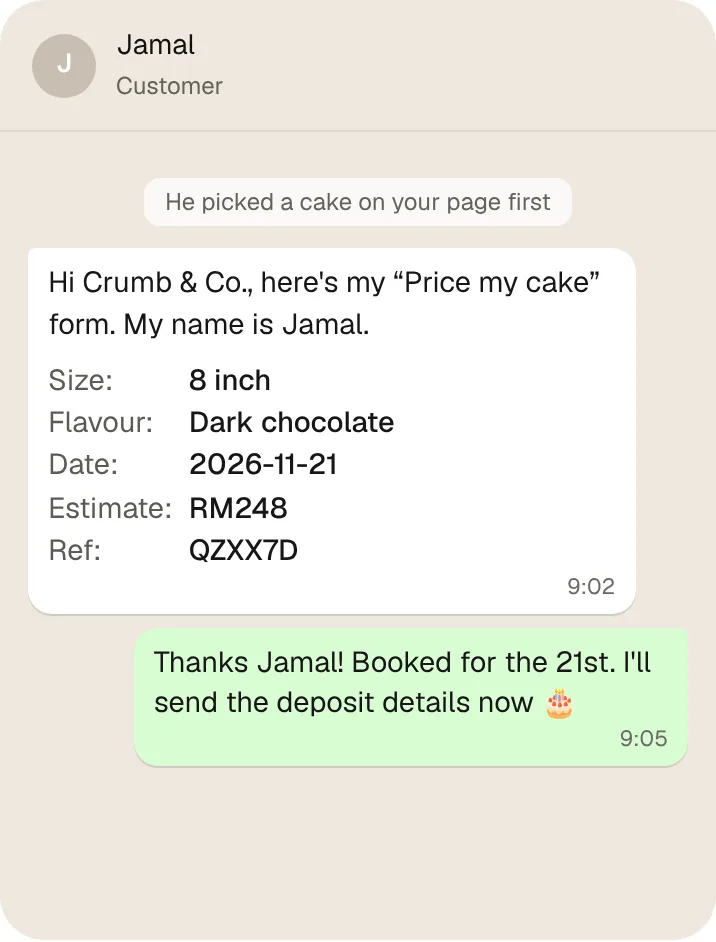
Because the order is saved, the numbers go further than clicks. Linkfyn's analytics follow a visit to a sent form and then to a sale you marked as won, and they show which post, story or ad it came from. On the Business plan, each new order and each sale is also reported to Meta and TikTok, so your ads learn from buyers and not only from people who tap.
Linktree and Linkfyn side by side
| You want to | Linktree | Linkfyn |
|---|---|---|
| List links to your content | Yes, its main job | Yes, as a Links block |
| Show photos, reviews, hours and a map | Limited: a list with a few embeds | Yes, a page built from blocks |
| Ask order questions and show a price | No | Yes, a form with prices on each answer |
| Open WhatsApp with the order typed | No, a plain chat link | Yes, on WhatsApp and seven other chat apps |
| Take appointments at free times only | Through another booking tool | Yes, built in |
| Keep each order until it is paid | No | Yes, a board and a customer list |
| See which post or ad brought sales | Clicks and views | Visits, sent forms and sales, by source |
| Sell digital products or courses | Yes, with a checkout | No |
| Take payment on the page | Yes, for its own products | Not yet. You take payment in chat |
| Schedule social posts, grow an email list | Yes, on paid plans | No |
What each costs
Linktree's prices below are from its pricing page on the date above this guide. They change, so check them before you decide.
| Linktree | Linkfyn | |
|---|---|---|
| Free | Unlimited basic links | Your page, one order form, appointments, the orders board, 7 days of analytics |
| First paid plan | Starter, US$9 a month, or US$7 a month paid yearly | Pro, about US$5 a month (RM19 in Malaysia), 2 months free paid yearly |
| Next plan | Pro, US$17 a month, or US$14 paid yearly | Business, US$15 a month (RM59): ads tracking and sign-ins for your team |
| Top single plan | Premium, US$35 a month, or US$30 paid yearly | Agency, US$49 a month (RM199), for up to 10 businesses |
The plans are not like for like. Linktree's higher plans add tools for creators, and Linkfyn's add tools for taking and tracking orders. Compare them by the job you need done, not by the number.
Moving from Linktree takes one box
You don't have to rebuild your links by hand. When you make a Linkfyn page, the first screen has a box that asks "Have a Linktree?". Type your Linktree address and Linkfyn reads your public page: your profile photo, name and bio become the top of the new page, your links arrive in the same order under their headings, a WhatsApp link becomes a chat button, and your social accounts become a row of icons. An order form for your kind of business is added under them.
Then change the link in your Instagram and TikTok bio. Your Linktree page stays up until you close it, so nothing breaks on the day you switch.
Which one should you use?
- Stay on Linktree if you are a creator, musician or writer, if followers only need your links, or if you sell downloads and courses with a checkout.
- Use an online shop if customers can buy a fixed item without asking you anything. A cart and checkout will serve them better than either tool here.
- Use Linkfyn if every sale starts with a question in WhatsApp: made-to-order food, flowers and gifts, printing, beauty and spa, photography, home services, coaching.
More on the same subject: what to put on a link in bio page for WhatsApp, and how a WhatsApp order form works.
Questions
Is Linkfyn free like Linktree?
Both have a free plan. Linkfyn's free plan has your page with every block and theme, one order form, appointments, the orders board and 7 days of analytics. Linktree's free plan has unlimited basic links.
Can I move my Linktree links to Linkfyn?
Yes. When you make your page, type your Linktree address into the Have a Linktree box. Linkfyn reads your public page and brings in your photo, name, bio, links and social accounts. Links that are locked or behind a sign-up on Linktree are skipped.
Can customers pay on a Linkfyn page?
Not yet. The order arrives in your chat app with an estimate, and you confirm it and take payment the way you do now, such as a bank transfer or a payment link. If you sell digital products or courses with a checkout, Linktree does that and Linkfyn doesn't.
Does Linkfyn work with chat apps other than WhatsApp?
Yes. Each shop picks one chat app: WhatsApp, LINE, Telegram, Messenger, Viber, Instagram, Zalo or KakaoTalk. Orders open in that app.
Do I need WhatsApp Business API?
No. Linkfyn works with the normal WhatsApp and WhatsApp Business apps. The customer sends the order from their own phone and you reply yourself.
Can I keep my Linktree and use Linkfyn too?
Yes. Some businesses keep Linktree for content links and add their Linkfyn order form as one of the links. Most find one link in the bio is easier for customers, so they move the links over once the form is working.
Try it beside your Linktree
Make a page, bring your Linktree links in with one box, and send yourself a test order. A new shop gets every feature free for 14 days, with no card.
Linkfyn is invite-only for now, and free during early access. Leave your email and we'll send you an invite.
Pick your page's address. Free to start, no card needed.
Keep reading
- Link in bio for WhatsApp business: what to put on itWhat your page should hold when customers order in chat, and in what order.
- WhatsApp order form: how it works and what to askHow a form with prices sends a complete order to your WhatsApp in one message.
- How to keep track of WhatsApp ordersLabels, a spreadsheet, a form, or an order board: five ways to stop losing orders in your chats, and when to move up.
- WhatsApp link generatorMake a wa.me link with a message already typed, for your bio, posts and ads. Works in your browser.