Linkfyn › Link in bio analytics
Link in bio analytics: see what brings orders, not just clicks
Most link in bio tools tell you how many people tapped each button. If you sell through WhatsApp, a tap isn't a sale. What you want to know is which post or ad brought people who buy, where on your page they give up, and how many of the orders that came in you actually won. This guide covers what to measure, how to tag your links, and what to change when the numbers come in.
Linkfyn is invite-only for now, and free during early access. Leave your email and we'll send you an invite.
Pick your page's address. Free to start, no card needed.
Why clicks aren't enough
A click count answers one question: did people tap? For a shop that sells in chat, the money is three steps further on. Someone taps your WhatsApp button, asks a question, gets a price, and then buys or goes quiet. A link page that stops counting at the tap can't tell a story that brought ten buyers from one that brought a hundred browsers.
So the questions worth answering are:
- Where did my buyers come from? Your bio, a story, a TikTok ad, Google, a QR code on your packaging.
- Where do people stop? Do they leave at the top, read your prices and go, or start the order form and not send it?
- Did the ad pay for itself? Not how many chats it started, but how many sales and how much money.
- Are orders waiting? A lead that sits in New for a day is often a lost sale.
Follow each visit to the sale
Linkfyn counts six steps, in two halves. The first three happen on your page and are counted for you. The last three happen in the chat, so you record them by moving the order on your Leads board, which you do anyway to keep track of who has paid.
On your page
- Opened your linkEvery visit to your page.
- StartedThey tapped a chat button or began a form.
- Finished, new leadThey sent a form. The order lands in your chat and on your Leads board.
In your Leads
- TalkingYou're chatting about the order.
- Quoted or bookedYou've given a price or a date.
- WonThey paid, with the amount you type in.
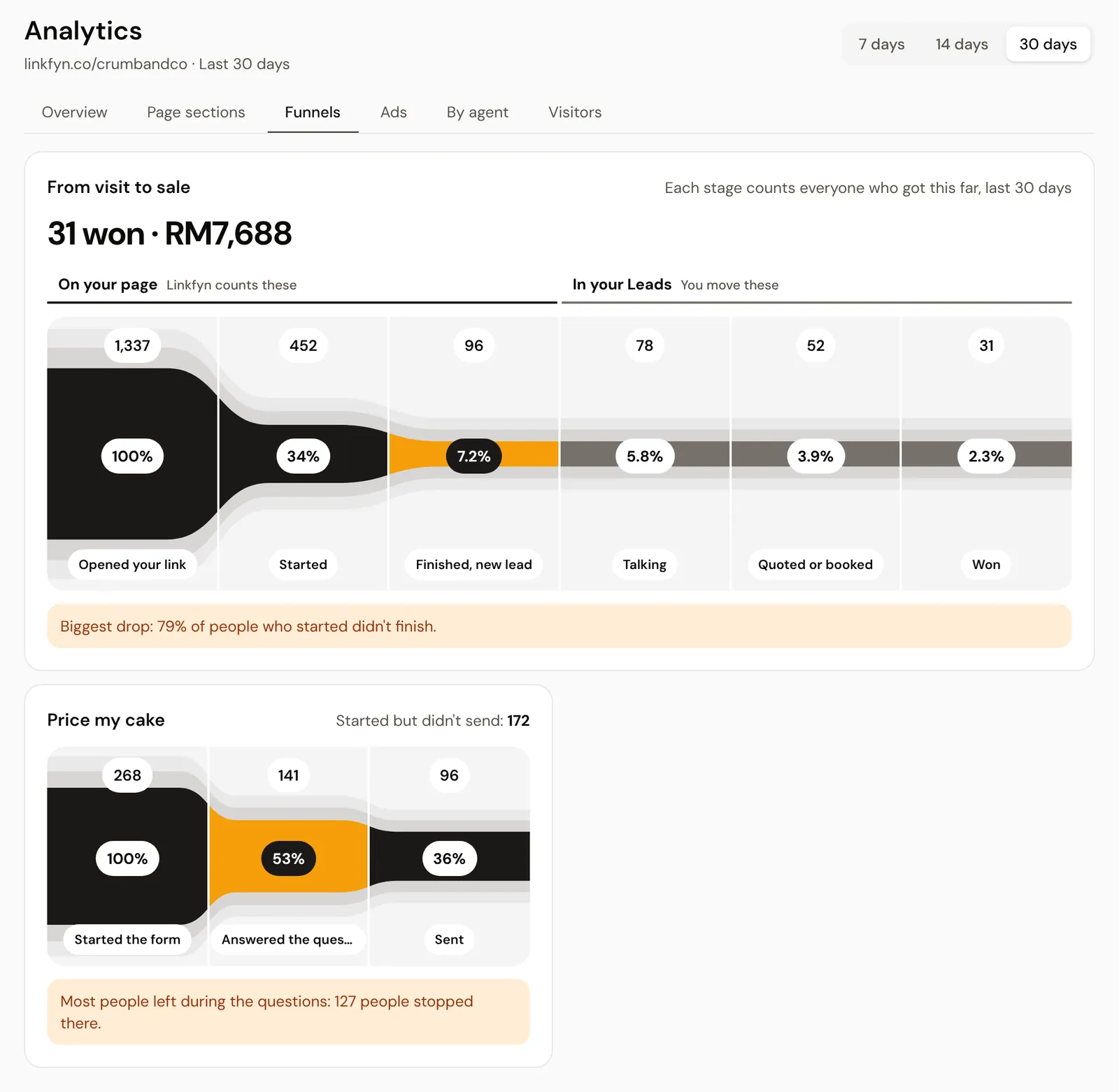
Seen together, the steps show where to work. Lots of visits and few starts means the top of your page isn't doing its job. Lots of starts and few sent forms means the form asks too much. Lots of leads and few wins means the chat is where sales slip away, often because replies come late. Each form also gets its own close-up: how many started it, answered the questions and sent it.
A tap on a chat button opens WhatsApp with a greeting typed. It counts as a direct chat, but it isn't a lead, because nobody filled anything in. Linkfyn shows those taps on their own so you can see both.
Tag your links to see which post or ad works
Without any setup, Linkfyn names where each visit came from when the browser says so: Instagram, Facebook, TikTok, Google, WhatsApp or another site. Visits with no clue, such as a typed address or some in-app browsers, show as Direct.
To tell one post or ad from another, add tags to the link. Tags are the standard utm_ words that go after a ?:
- In a story about your new cake:
linkfyn.co/yourshop?utm_source=instagram&utm_campaign=raya-cake - On the QR code on your boxes:
linkfyn.co/yourshop?utm_source=qr&utm_campaign=box - In your Meta and TikTok ads: Linkfyn gives you a line to paste into the ad's URL parameters, which fills in the campaign and ad name for you.
The tags stay with the visit, and with the lead if they send a form. The Ads tab then lists each tagged link with its visitors, leads, sales and sales value, all the way to the sale. Leads that came from an ad link with no tags are listed too, with a reminder to add them.
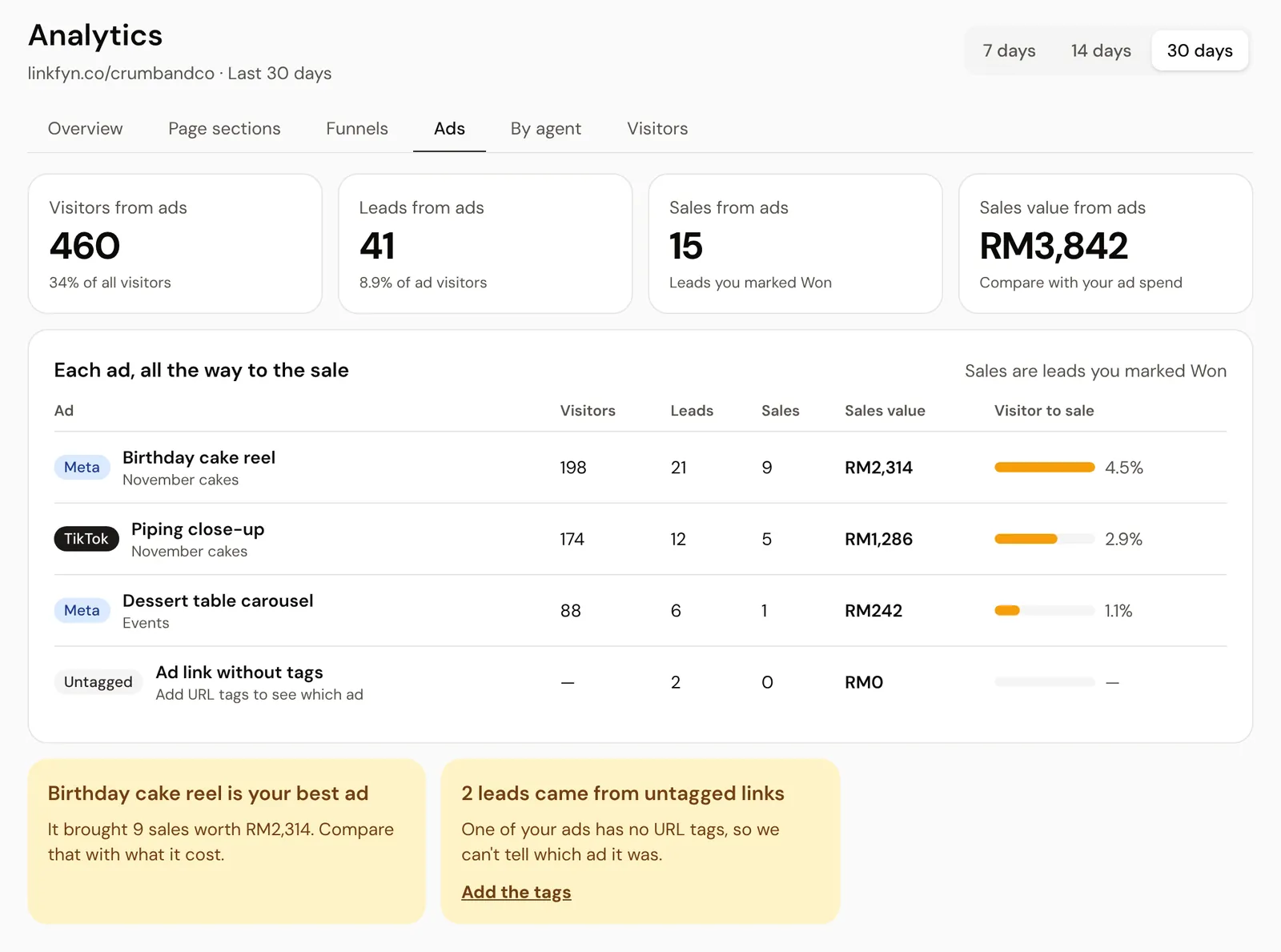
Compare the sales value with what each ad cost in your ads manager. An ad with fewer clicks and more sales is the better ad, even if the ad platform says otherwise.
See which parts of your page work
Your page is made of blocks: the top section, your items and prices, the order form, reviews, questions. For each one, Linkfyn shows how many visitors scrolled to it, how long they stayed and how often they tapped it, and colours your page by attention so the busy parts stand out.
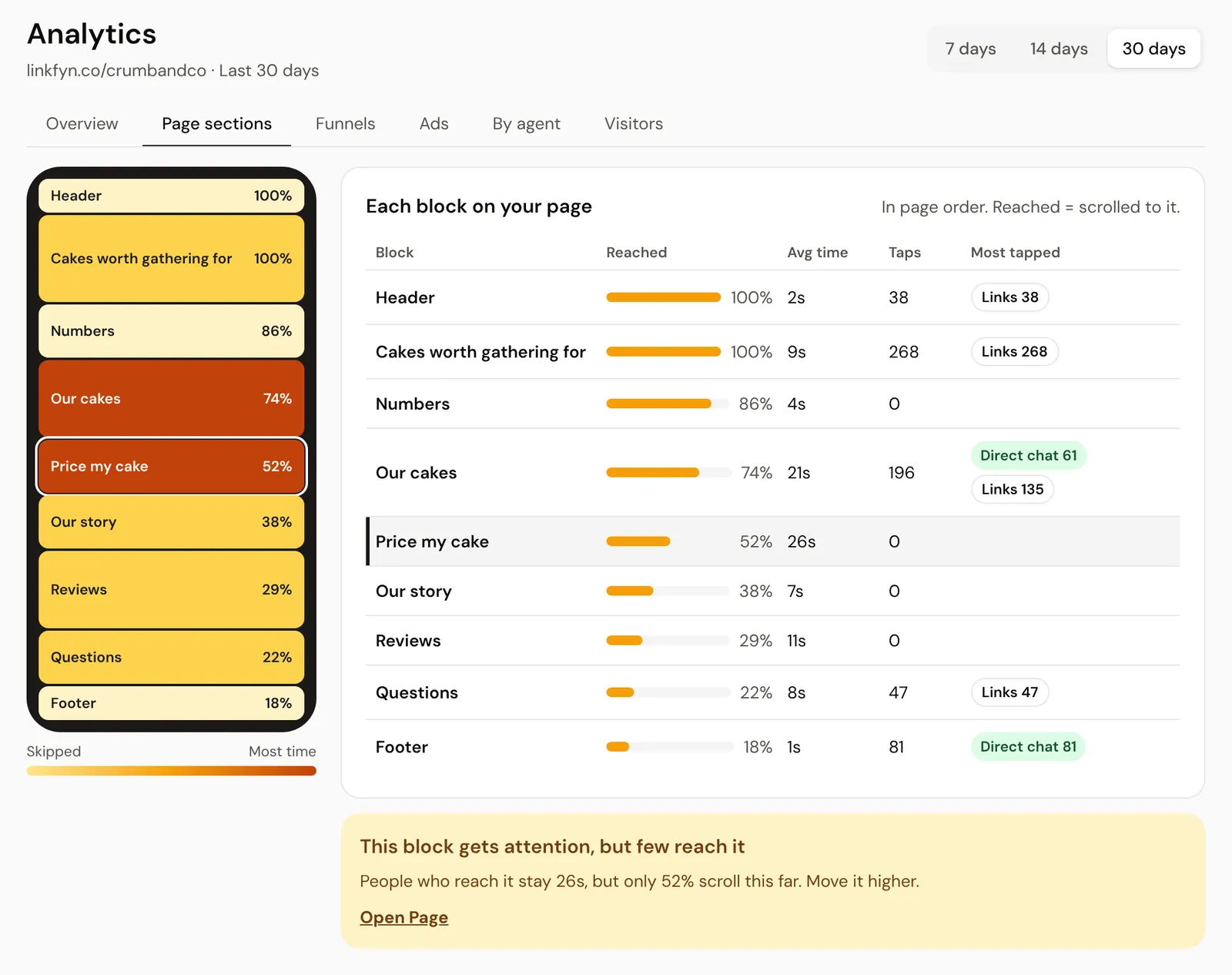
Under the numbers, Analytics points out what stands out, in plain words, such as:
- "Most people never reach Reviews": move your proof higher.
- "Most visitors leave without tapping": put your main button in the first block people see.
- "12 started Price my cake but didn't send": ask fewer questions.
- "3 leads waiting over a day": reply to them first.
If your team shares the orders (on Business), a By agent tab shows each person's leads, how many they won and how many are waiting.
Tell your ads who buys
Meta and TikTok learn from what you tell them. A pixel on a link page can only report clicks, so the ads learn to find people who click. On the Business plan, Linkfyn tells them when a form is sent and when you mark an order Won, with its value, sent from Linkfyn's server rather than a script on your page. The ads then learn to find people who buy. Customers are told this on the form before they send it.
Analytics your customers don't have to accept
Linkfyn's visit counter sets no cookies on your page and stops when a visitor's browser asks not to be tracked. Visitors stay anonymous; a name only appears on a visit when that person sends you a form, and only for people on your team who may see that lead. What customers type into a form is kept with the lead, never in your analytics.
A ten-minute weekly check
- Overview: how many visitors, direct chats, new leads and wins this week, and where people came from.
- Funnels: find the biggest drop. Fix that one thing, not five.
- Ads: pause the ad with visitors and no sales; give its money to the one with sales.
- Leads: clear anything waiting over a day, and mark last week's orders Won or Lost so next week's numbers are true.
Questions
Can I see which Instagram post or story brought an order?
Yes, if the link carries a tag. Add a different utm_campaign to the link in each story, post or ad, and Linkfyn shows the visits, leads, sales and sales value for each one. Links without a tag still show where people came from, such as Instagram or Google, but not which post.
Do I need Google Analytics or a pixel on my page?
No. Analytics are built into every Linkfyn page, with nothing to install. If you run Meta or TikTok ads, you add your pixel ID in Linkfyn's settings, and Linkfyn sends the events from its server, so no ad script is added to your page.
Does Linkfyn read my WhatsApp chats?
No. Linkfyn counts the taps on your chat buttons and the forms people send. What happens in the chat stays between you and your customer; you move the order to Talking, Quoted or Won yourself.
Does it use cookies?
Not on your page. The visit counter sets no cookies and stops when a visitor's browser asks not to be tracked. Visitors stay anonymous unless they send you a form, and their answers are never added to your analytics.
How far back can I look?
Free shows your last 7 days. Pro and up add longer ranges, up to 30 days at a time.
What does it cost?
There's a Free plan. Pro is about US$5 a month, and Business, which adds ads tracking and your team, is about US$15. A new shop gets Business free for 14 days, no card needed.
See what brings your orders
Linkfyn gives you a page for your business, an order form that adds up the price, a board that keeps every order until it is won, and analytics that follow each visit to the sale. Start here.
Linkfyn is invite-only for now, and free during early access. Leave your email and we'll send you an invite.
Pick your page's address. Free to start, no card needed.