
Linkfyn › Quote request form
Quote request form: price custom orders before the chat
If you print shirts, mugs, stickers or banners, or make anything to order, most jobs start with "How much for 50?" in WhatsApp, and the next ten messages are you asking what, which size, how many colours and by when. A quote request form asks all of that up front. This guide covers what a quote form for custom orders should ask, when to show a price before you reply, and what happens to the request after it reaches your WhatsApp.
Linkfyn is invite-only for now, and free during early access. Leave your email and we'll send you an invite.
Pick your page's address. Free to start, no card needed.
How a quote request form works
You put one link in your Instagram bio, your WhatsApp status or your Google profile, and on a "Get a quote" button. The customer opens the form, picks the product, the options and how many, and leaves their name and number. Then WhatsApp opens on their phone with the whole request typed out, and they press send. You start the chat with everything you need to price the job.
The usual quote form templates (WPForms, Typeform, Jotform and the like) stop there: they collect answers into an inbox, and you work out the price and reply later. Two things make a quote form for chat sellers work better:
- A price as they pick. When most jobs follow a price list, the form can add it up and show an exact price or a range. People who can't afford it don't send, and people who can arrive ready to order.
- The request lands where you already reply. No separate inbox to check. It arrives in WhatsApp as one message, and it is saved in Linkfyn so it doesn't get buried under newer chats.
What a quote form for custom orders should ask
Ask what changes the price, in the order a customer thinks about the job. Leave the rest for the chat.
- The product: T-shirts, hoodies, mugs, stickers, banners, cards. Cards with a photo each are quicker to pick on a phone than a list.
- The options that change the price: material or shirt type, size of the print, one side or two, number of colours, finish.
- How many. Use a quantity question, so a bigger order can show its lower price per piece.
- When they need it, as a date. Rush jobs can cost more: add it as an option with its own price.
- Pickup or delivery, and the area if you deliver.
- A short note for the wording, the colours or the idea behind the design.
- Name and phone number, so you can reply in WhatsApp.
Artwork and logos come in the chat: the form tells the customer to send the file in WhatsApp, which opens as soon as they send the request.
Showing a price before you reply
On a Linkfyn form, each answer can carry a price: "Cotton tee" from RM22, "Print on the back" +RM8, "Rush (3 days)" +RM30. A Quantity question multiplies it and can take money off each piece from a number you set, such as RM2 off each from 50 pieces, telling the customer how many more they need for the next saving. A Total field shows the result as an exact price or, where the final price depends on the artwork, a range such as "RM180 to RM220". It can stay in view at the bottom of the screen while they pick.
The total is checked again on Linkfyn's server, so the estimate in the message is the one your form gives, not one a customer typed. You still confirm the final price in the chat once you have seen the artwork.
A form can also change as they answer: show the sleeve print question only for shirts, or skip the size question for stickers, so each customer sees only what applies to them.
What happens after someone asks for a quote
- It arrives in WhatsApp as one message: each answer, the estimate and a short reference link back to the request.
- You hear about it at once, by email and, if you turn them on, a notification on your phone.
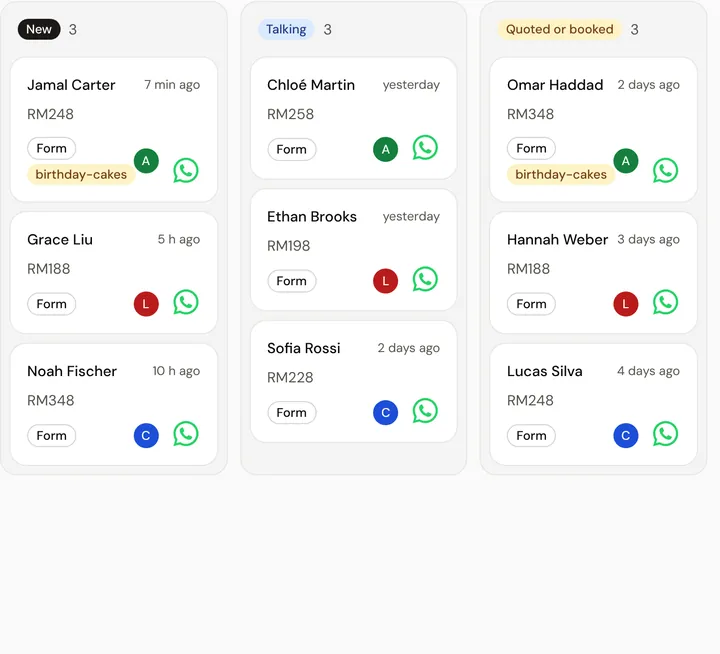
- It is saved on your Leads board under New. Move it to Talking, Quoted and Won as the job goes on, so a request you haven't answered never gets lost in the chat list.
- Won jobs keep their amount, so you can see what your quotes turn into, and which ads brought the customers who bought.
- Returning customers are joined up by phone number, so you see their earlier jobs when they ask again.
Who it suits
- Printing: T-shirts and team jerseys, mugs, stickers, name cards, banners and signage.
- Custom gifts: engraving, personalised hampers, corporate door gifts.
- Made to order: furniture, curtains, tailoring, anything priced by size and material.
- Services priced by the job: cleaning, aircon servicing, small renovations, where the size of the job sets the price.
Selling food or cakes to order? See WhatsApp order form and custom cake order form. Taking appointments instead? See WhatsApp booking form.
Questions
Should a quote form show a price at all?
Show one when most of your jobs follow a price list, even as a range such as RM180 to RM220. Customers who see a number early either send the request or leave, and either way you don't spend a chat on someone who was never going to buy. If every job is truly one of a kind, skip the Total field and the form still collects everything you need to price it.
Can I give a lower price per piece for bigger orders?
Yes. A Quantity question can take money off each piece from a number you choose, for example RM2 off each from 50 pieces, and it tells the customer how many more they need for the next saving. The total updates as they change the number.
Can customers upload their artwork or logo?
Not in the form yet. Add a file question and the form tells the customer to send the file in WhatsApp, which opens right after they send the request, so the artwork lands in the same chat as the order.
Is the price on the form binding?
It is the estimate you set up, and the request says so. You still confirm the final price in the chat, after you have seen the artwork. When the job is won, you record the amount it sold for.
Do I need the WhatsApp Business API?
No. It works with the normal WhatsApp app and with WhatsApp Business. The customer sends the request from their own phone, and you reply yourself. Shops on LINE, Telegram and other chat apps can use it too.
What does it cost?
There's a Free plan. Pro is about US$5 a month, and Business, which adds ads tracking and your team, is about US$15. A new shop gets Business free for 14 days, no card needed.
Make your quote form
Linkfyn gives you a page for your business, a quote form that adds up the price, and a board that keeps every request until it is won. Start here.
Linkfyn is invite-only for now, and free during early access. Leave your email and we'll send you an invite.
Pick your page's address. Free to start, no card needed.