
Linkfyn › WhatsApp order form
WhatsApp order form: the whole order in one message
A WhatsApp order form is a short form on a web page. Your customer picks what they want and sees the price, and when they tap Send, WhatsApp opens with the full order already typed out for you. This page explains how one works, what to ask in it, and how to make one with Linkfyn.
Linkfyn is invite-only for now, and free during early access. Leave your email and we'll send you an invite.
Pick your page's address. Free to start, no card needed.
Why take orders with a form
If you sell through WhatsApp, most orders start the same way: "Hi, how much?" Then you ask the size, the flavour, the date, pickup or delivery, and the address, one message at a time. It takes ten minutes per customer, and some of them stop replying halfway.
A form asks all of that before the chat starts. The customer answers at their own speed, and the first message you get is a complete order:
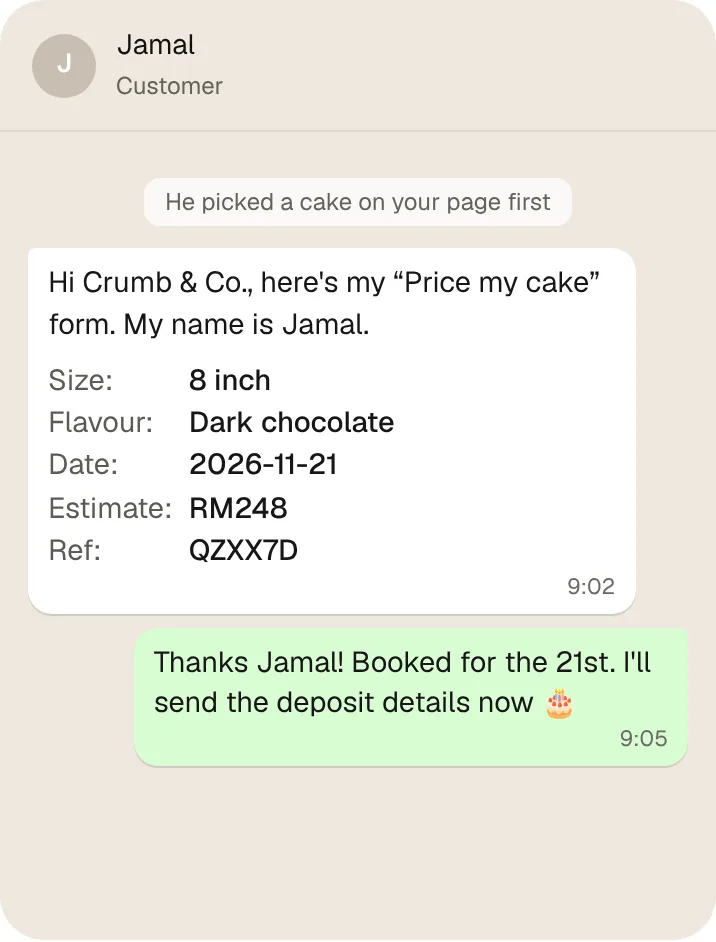
You reply to confirm, and the chat carries on as usual. Nothing changes about how you talk to customers. Only the back and forth at the start goes away.
How a Linkfyn order form works
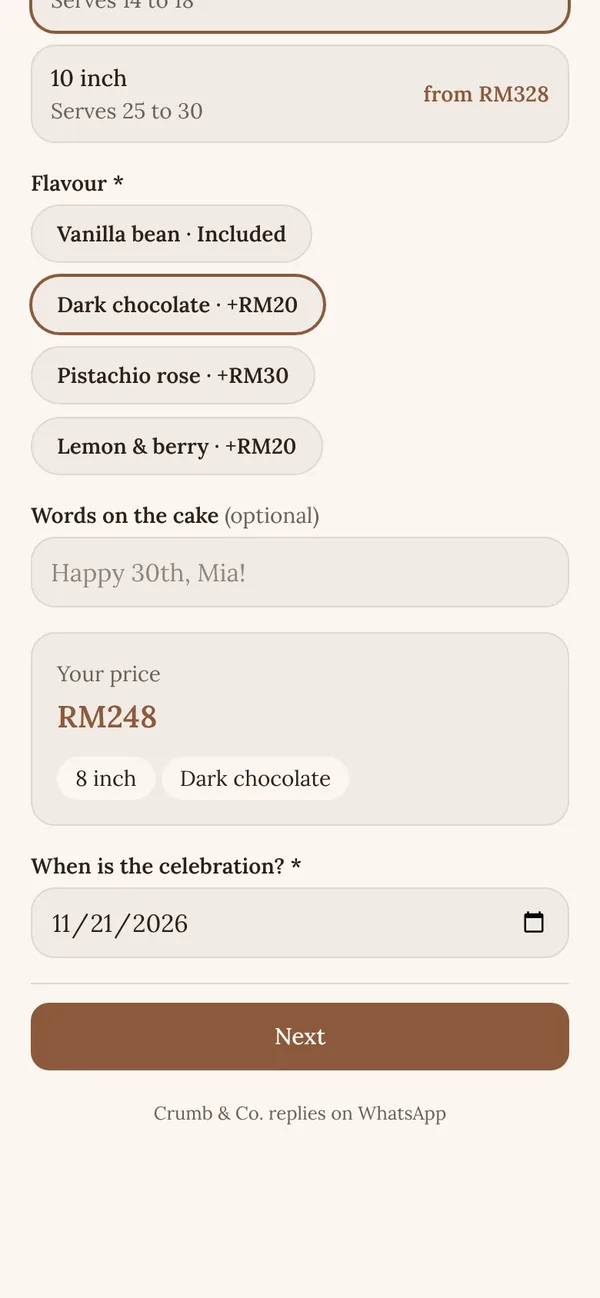
- You build the form. Add the questions you always ask: choices, quantities, dates, text, name and phone number. Put a price on an answer and the form adds up the total, as an exact price or a range.
- You share one link. The form sits on your own page at linkfyn.co/yourshop, with your photos, opening hours and reviews. Put the link in your Instagram or TikTok bio, your WhatsApp status and your ads.
- The customer fills it in. It opens in any browser, with nothing to install and no account to make. They see the price as they pick.
- WhatsApp opens with the order typed. They press send, and it arrives in your WhatsApp like any other message.
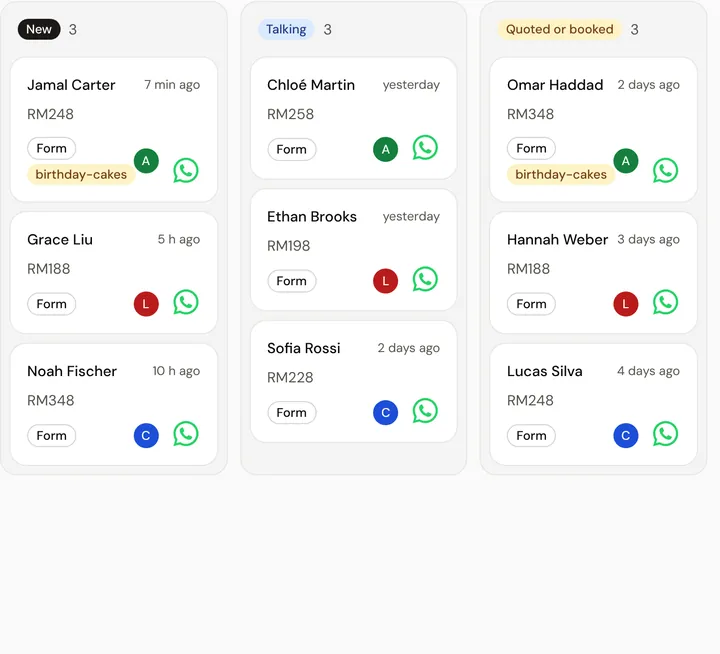
- The order is saved for you. Each order sent with a form is also kept in Linkfyn, so you can move it from New to Won and nothing gets buried in your chats.
What to ask in an order form
Ask only what you need to say yes and give a price. Every extra question loses a few customers. For most shops that sell by chat, it comes down to five things:
- What they want. Offer choices instead of an empty box where you can. Choices are quicker on a phone, and they can carry prices.
- How many, or what size.
- When they need it. A date tells you straight away whether you can take the order.
- Pickup or delivery, and the area if you deliver.
- Name and phone number, so the order has an owner even if the chat goes quiet.
Leave everything else for the chat. A form can also show a question only when it matters. For example, it can ask for the address only when the customer picks delivery.
Selling cakes? See what to ask in a custom cake order form, with sizes, flavours and how to price them.
After the order arrives
A form that only writes a message leaves you where you started, scrolling through chats to find who ordered what. Linkfyn keeps every order sent with a form on a board with five stages: New, Talking, Quoted or booked, Won and Lost. You also get an email when a new order comes in (in a very busy hour, one summary for the rest). For the other ways shops do this, from labels to a spreadsheet, see how to keep track of WhatsApp orders.
- A team on one link. Add each person with their own WhatsApp number and working hours. New orders take turns between whoever is on duty.
- Returning customers. Orders from the same phone number are joined up, so you can see what someone ordered before.
- Ads that learn. If you run Meta or TikTok ads, marking an order Won tells them about the sale and its value.
- Analytics. See how many people opened your page, started the form and sent it.
Is it the right tool for you?
An order form fits when a customer has to ask before they buy: cakes and food made to order, flowers and gifts, printing and custom products, beauty appointments, photography, home services and classes.
Taking appointments rather than orders? See WhatsApp booking form, where customers pick only times you have free.
Pricing custom jobs such as printing or engraving? See quote request form.
Setting up the page the form sits on? See link in bio for WhatsApp business: what to put on it, and in what order.
It is the wrong tool if your customers can buy a fixed item without talking to you. An online shop with a cart and checkout will serve them better. Linkfyn does not take payment on the page yet, and customers can't upload a file in a form yet. They send photos or files in the chat.
Questions
Do I need the WhatsApp Business API?
No. The form opens WhatsApp on your customer's phone with the order typed out, and they press send. It works with the normal WhatsApp app and with WhatsApp Business.
Does the form send messages for me?
No. Your customer sends the order from their own WhatsApp, and you reply yourself. There is no bot.
Can customers pay in the form?
Not yet. You confirm the order in the chat and share how to pay, the way you do today.
What if my price depends on the order?
Put a price on each answer and the form adds them up. You can show an exact total, a range, or no price at all.
Does it work with other chat apps?
Yes. A shop picks one chat app: WhatsApp, LINE, Telegram, Messenger, Viber, Instagram, Zalo or KakaoTalk. Instagram, Zalo and KakaoTalk don't let a link type the message, so the order is copied and your customer pastes it.
What does it cost?
There's a Free plan. Pro is about US$5 a month, and Business, which adds ads tracking and your team, is about US$15. A new shop gets Business free for 14 days, no card needed.
Make your WhatsApp order form
Linkfyn gives you a page for your shop, an order form with prices, and a board that keeps every order. Start here.
Linkfyn is invite-only for now, and free during early access. Leave your email and we'll send you an invite.
Pick your page's address. Free to start, no card needed.