
Linkfyn › Custom cake order form
Custom cake order form: what to ask, and how to price it
A custom cake order takes a dozen answers before you can quote it: size, flavour, filling, design, the words on top, the date, pickup or delivery. This guide lists the questions a cake order form should ask, how to put a price on each answer, and how to have the finished order land in your WhatsApp as one message.
Linkfyn is invite-only for now, and free during early access. Leave your email and we'll send you an invite.
Pick your page's address. Free to start, no card needed.
The questions a cake order form should ask
Put them in the order a customer thinks about a cake: first what it is for and when, then the cake itself, then the details. Use choices wherever you can. Tapping "8 inch" is quicker on a phone than typing it, and a choice can carry a price.
- What it's for. Birthday, wedding, anniversary, baby shower, corporate event. It tells you the style before you see a single photo.
- The date they need it. Ask early. If you are fully booked that day, both of you find out before anyone writes a long message.
- Size, or how many people it should feed. Offer your real sizes as choices (6, 8 or 10 inch, or two tiers). Many customers know the guest count better than the size, so say how many each size serves.
- Flavour and filling. A short list of what you actually bake. Keep "Other" off the list unless you are happy to quote anything.
- Design. A colour, a theme or a character, as a few words. Ask for a reference photo in the chat, where it is easy to send.
- Words on the cake, with the spelling exactly as they want it.
- Allergies or dietary needs, such as nuts, eggless or halal ingredients. Ask even if you can't cater for all of them, so you can say so before you quote.
- Pickup or delivery. Ask for the area or address only when they pick delivery.
- Name and phone number, so the order has an owner even if the chat goes quiet.
That is nine questions, and most are a single tap. If your cakes are simpler, drop what you don't need: a brownie box needs a quantity, a date and pickup or delivery, and that's all.
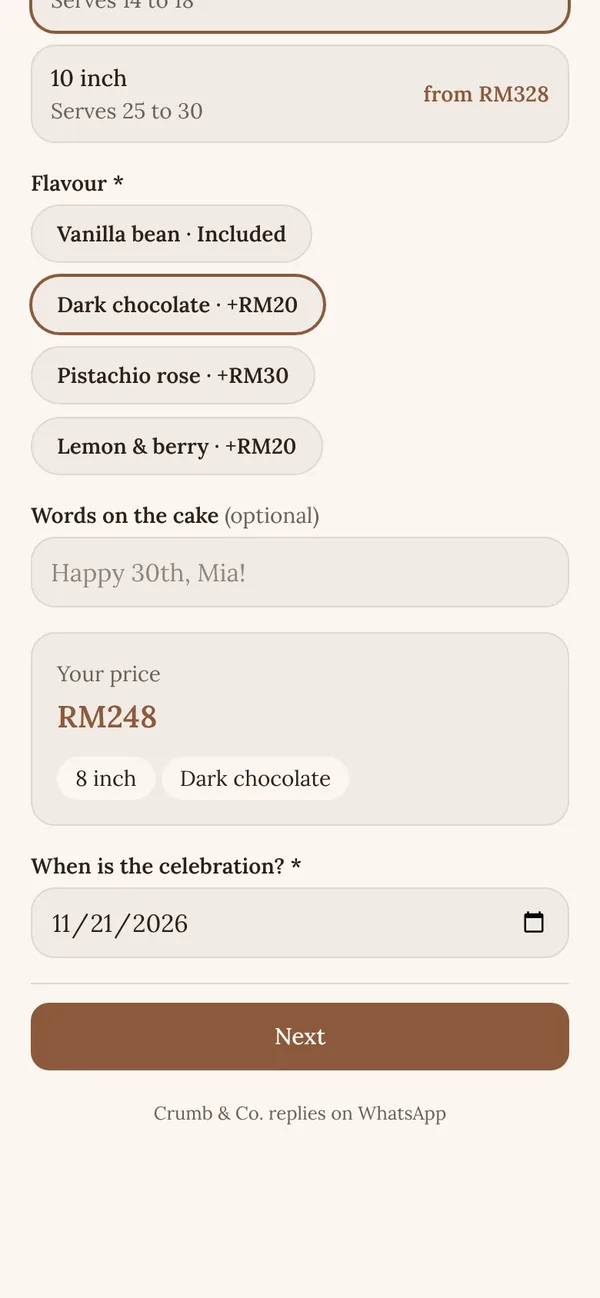
How to price a custom cake in the form
Most home bakers price a cake from a base price for the size, plus extras. A form can do the same sum for the customer:
- Size carries the base price. For example, 6 inch RM120, 8 inch RM180, 10 inch RM240.
- Flavours and fillings add to it. Classic flavours add nothing, and a premium one adds a set amount.
- Extras add their own price. A topper, fresh flowers, a second tier, or delivery.
When the final price depends on the design, show a range instead of an exact total, such as "RM180 to RM260". The customer knows roughly what to expect before they message you, and you still quote the real price in the chat. The prices above are an example only; use your own.
Showing a price early saves you the "how much?" chats that never turn into an order. The people who send the form have already seen the price and are still interested.
Notice, deposits and the chat
Two things don't belong in the form, and both are easy to handle in the chat:
- Minimum notice. Say it in the date question, such as "Date you need it (we need 3 days' notice)". If someone asks for tomorrow anyway, you can say no in one message.
- Deposits. Linkfyn doesn't take payment on the page yet. When you confirm the order in the chat, send your bank details or payment link and ask for the deposit the way you do now.
Reference photos also go in the chat, because customers can't upload a file in a Linkfyn form yet.
How the order reaches you
When the customer taps Send, WhatsApp opens on their phone with the whole order typed out. They press send, and it arrives in your WhatsApp like any other message:
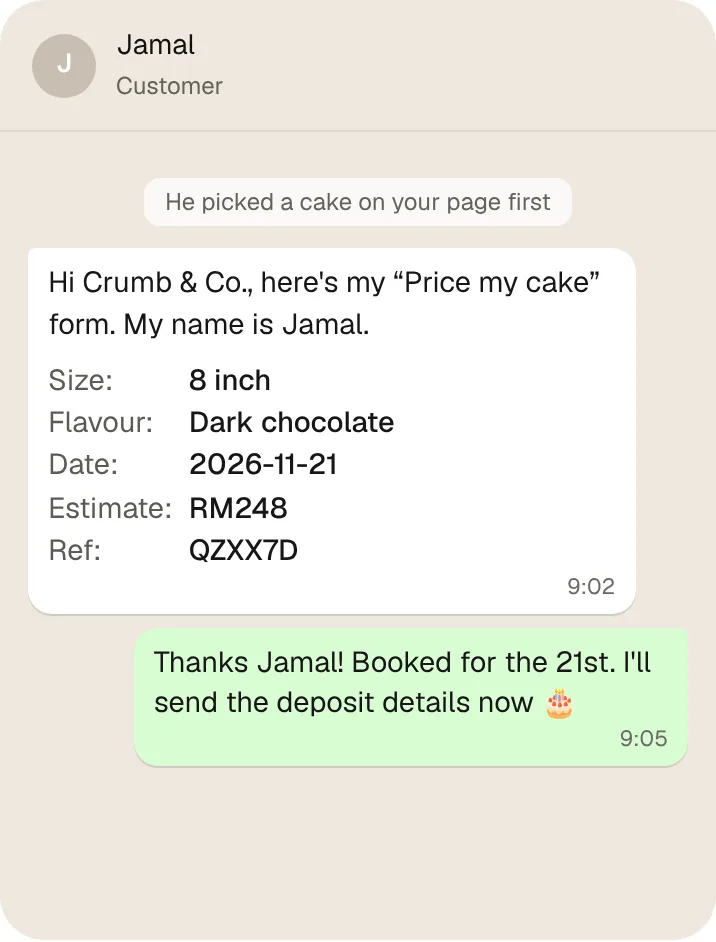
Each order sent with the form is also saved in Linkfyn, on a board with five stages: New, Talking, Quoted or booked, Won and Lost. In the week before a busy holiday, you can see every cake you have promised without scrolling back through chats. Orders from the same phone number are joined up, so a returning customer's last cake is one tap away.
For the general guide to order forms for any kind of shop, see WhatsApp order form. This guide is also in Malay: Borang tempahan kek.
A page for your cake shop
The form sits on your own page at linkfyn.co/yourshop, with your photos, what you bake, reviews and opening hours. Put that one link in your Instagram or TikTok bio and your WhatsApp status. When you set up a new shop and pick "Cakes and food to order", Linkfyn starts you with a page and an order form for a bakery, which you then change to fit yours.
Questions
Can I use Google Forms for cake orders?
Yes, and many bakers do. The difference is what happens after. A Google Form saves answers to a sheet, and you still have to message the customer. A Linkfyn form shows the price as they pick and opens WhatsApp with the order typed, so the chat starts with a complete order.
Can customers upload a photo of the cake they want?
Not in the form yet. They send the photo in the WhatsApp chat after the order arrives.
Can the form stop orders that are too close to the date?
Write your minimum notice in the date question so customers see it before they pick. You then confirm or decline each order in the chat.
Can customers pay a deposit in the form?
Not yet. You confirm the order in the chat and share how to pay, the way you do today.
Do I need the WhatsApp Business API?
No. It works with the normal WhatsApp app and with WhatsApp Business. Your customer sends the order from their own phone, and you reply yourself.
What does it cost?
There's a Free plan. Pro is about US$5 a month, and Business, which adds ads tracking and your team, is about US$15. A new shop gets Business free for 14 days, no card needed.
Make your cake order form
Linkfyn gives you a page for your cake shop, an order form with prices, and a board that keeps every order. Start here.
Linkfyn is invite-only for now, and free during early access. Leave your email and we'll send you an invite.
Pick your page's address. Free to start, no card needed.