
Linkfyn › Guides › Track WhatsApp orders
How to keep track of WhatsApp orders
Selling on WhatsApp works until the week you are busy. Then an order sits forty chats down, a deposit is in a screenshot you can't find, and a customer asks "is my cake ready?" about a cake you forgot. Here are five ways to keep track of WhatsApp orders, starting with the ones that cost nothing, and an honest note on where each one breaks.
Linkfyn is invite-only for now, and free during early access. Leave your email and we'll send you an invite.
Pick your page's address. Free to start, no card needed.
Short answer. Up to a handful of orders a week, labels in WhatsApp Business and a notebook are enough. Past that, the order has to be written down by the customer and not by you, in one place, with a status you can change. That is an order form with a board behind it.
Why orders get lost in WhatsApp
WhatsApp is a chat app, so it sorts by the latest message and nothing else. An order isn't one message. It is spread over a conversation: the size in one line, the date three lines later, the address the next morning, a voice note in between. Three things follow from that:
- There is no list. You can't ask WhatsApp "what do I owe people this Saturday?". You scroll, chat by chat.
- There is no status. Quoted, deposit paid, ready, delivered: all of it lives in your head.
- There are no totals. At the end of the month you can't see how many people asked, how many bought, or what a customer ordered last time.
Any method that works has to give you those three things back.
1. Labels in WhatsApp Business
The free WhatsApp Business app lets you put colour labels on chats. It comes with a starter set that includes New customer, New order, Pending payment, Paid and Order complete, and you can rename them or add your own. Press and hold a chat, tap the label icon, and filter your chat list by label later.
Good for: seeing which chats still need you. It costs nothing and you are already in the app.
Breaks when: you forget to change a label, which happens on exactly the days you are busiest. A label also sits on the chat, not on the order, so a regular customer with two orders has one label. And it still holds no dates or amounts.
2. Starred messages and pinned chats
Star the message that holds the order details, and pin the chats you must deal with today. WhatsApp keeps every starred message in one list.
Good for: finding an address or a bank slip again quickly.
Breaks when: the list grows. Stars have no order, no date needed and no way to mark one as done, and you can only pin three chats.
3. A notebook or a spreadsheet
This is what most shops do, and it works. One row per order: date ordered, customer, phone, what they want, date needed, price, deposit, status. A Google Sheet on your phone is enough, and a paper book beside the oven is fine too.
Good for: a real list with dates and totals. You can sort by date needed and see Saturday at a glance.
Breaks when: you are the one typing every row. Copying an order out of a chat takes a few minutes, and at ten orders a day it is the first job that gets skipped. A missed row is a missed order.
4. A form that fills the sheet for you
The next step is to make the customer write the order. A Google Form or a similar form tool asks for the size, date and address, and each answer lands in a sheet as a new row with no typing from you.
Good for: complete orders. The customer can't forget the date, because the form won't send without it.
Breaks when: the customer finishes the form and nothing happens. The answers are in a sheet, the conversation is in WhatsApp, and you have to match one to the other and message the customer yourself. Many customers also stop when a link takes them out of the chat to a form that looks nothing like your shop.
5. An order form that opens WhatsApp and keeps the order
The last step joins the two halves. The form sits on your own page. The customer picks what they want and sees a price. When they tap send, WhatsApp opens on their phone with the whole order typed as one message, and the same order is saved for you in the same moment.
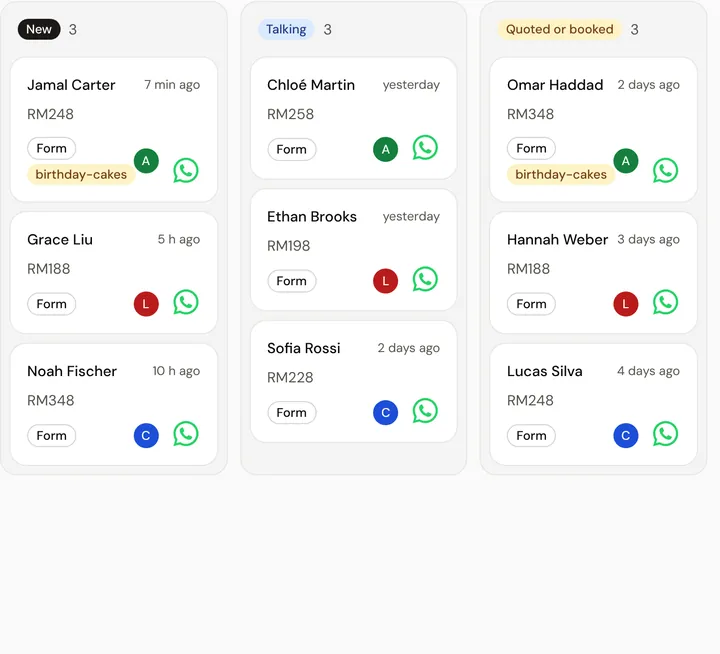
This is what a WhatsApp order form on Linkfyn does. On your side, each order is a card on a board with five columns: New, Talking, Quoted or booked, Won and Lost. You move a card as the order moves, and when you mark one as won you type what the order was worth. That gives back the three things WhatsApp lacks:
- A list. Every order, newest first, searchable by name, phone or email.
- A status. One look shows what is quoted and still waiting on a deposit.
- Totals. Orders from the same phone number are joined into one customer, with how many times they ordered and how much they spent. Analytics show visits, sent forms and sales, and where each came from.
Each message a customer sends also ends with a short reference link. Tap it in the chat and that order opens on your board, so you never have to search for it.
Breaks when: customers skip the form and message you directly, since only a sent form is saved. It also doesn't take payment. You confirm in chat and collect the deposit the way you do now.
Which one to pick
| Orders a week | Use | Your time per order |
|---|---|---|
| Under 5 | Labels and starred messages | A few taps |
| 5 to 20 | Labels plus a spreadsheet | A few minutes of typing |
| 20 or more, or a team | An order form with a board | None to record it, one tap to move it |
The numbers are a rough guide, not a rule. The real sign to move up is the first order you forget.
If you work with other people, look at who can see what. A shared phone means everyone reads every chat. On Linkfyn's Business plan each person has their own sign-in, new orders are shared out between them, and each one sees the orders they handle.
Questions
Can WhatsApp itself keep track of orders?
Partly. The WhatsApp Business app has labels such as New order, Pending payment and Paid, and a catalogue with a cart. It has no list of orders with dates and amounts, and no totals, so most shops add a notebook, a spreadsheet or an order tool beside it.
What is the best free way to track WhatsApp orders?
For a few orders a week, labels in WhatsApp Business plus a simple spreadsheet. For more than that, an order form that saves each order for you, which Linkfyn has on its free plan.
Does Linkfyn read my WhatsApp chats?
No. Linkfyn never connects to your WhatsApp account. It saves the order the customer sends through the form on your page, and the chat itself stays between you and the customer.
What about customers who message me directly without the form?
They are not on the board, because only a sent form is saved. Most shops reply to a direct message with the link to their form, so the order still arrives complete and is kept.
Do I need WhatsApp Business API or a chatbot?
No. Everything in this guide works with the normal WhatsApp or WhatsApp Business app on your phone, and you reply to customers yourself.
Put your orders on a board
Make a page with an order form. Every order a customer sends opens in your WhatsApp and is saved on your board at the same time.
Linkfyn is invite-only for now, and free during early access. Leave your email and we'll send you an invite.
Pick your page's address. Free to start, no card needed.
Keep reading
- WhatsApp order form: how it works and what to askHow a form with prices sends a complete order to your WhatsApp in one message.
- Link in bio analytics: see what brings ordersWhat to measure when sales close in chat: sources, page sections, ads and won orders.
- Linktree alternative for WhatsApp sellersWhat Linktree does well, where it stops for a business that takes orders in chat, and how the prices compare.
- WhatsApp link generatorMake a wa.me link with a message already typed, for your bio, posts and ads. Works in your browser.